
Stop Dreading Medicaid Billing. Finally.
SLP Now turns your session documentation into Medicaid-ready billing notes with one click, so you can wrap up billing in minutes, not hours.
Why School-Based Medicaid Billing Feels So Hard
It's not you. It's the process.
Billing feels hard because it's disconnected from everything else you do.
You document sessions in one place, keep notes in another, and then have to reconstruct everything, when you can't quite remember the details, to enter it into your billing software.
The result is billing that feels like a second job, piled on top of an already full one.
SLP Now solves this by making billing a natural byproduct of your session documentation, not a separate task.
How SLP Now Makes Billing Simple
Document once. Billing takes care of itself.

Document during your session: At the end of each session, enter student accuracy and the supports you provided. This takes about 60 seconds per group. SLP Now loads a pre-formatted note template automatically, so there is no typing the same structure over and over.
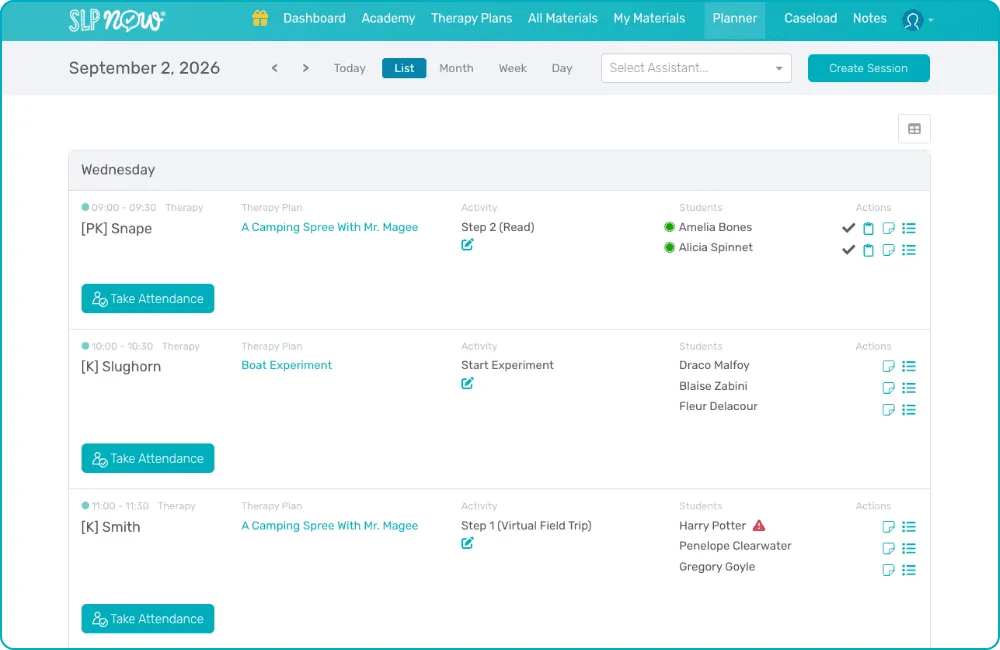
See your billing queue at the end of the day: Switch to the list view of your planner. Every student with a completed session note shows a clipboard icon next to their name. No guessing who's been documented and who hasn't.
Click the clipboard. Copy the note. Paste into your billing software: One click copies the formatted billing note to your clipboard. Open your Medicaid billing system, paste, and move to the next student. Click, paste, click, paste through your entire caseload in minutes.
Done: That's it. No reconstruction. No format translation. No end-of-week panic.

Every note, formatted for what your billing software needs.

SLP Now's session notes are built around the documentation requirements that matter for Medicaid billing: the goal targeted, the student's response, the level and type of support provided, and the session date.
Note templates are fully customizable to match your district's specific requirements, and if you're not sure where to start, you can email our team your format and we'll program it in for you.
Pre-formatted templates optimized for billing documentation
Customizable to match district-specific Medicaid requirements
Support level documentation with a customizable dropdown
Attendance tracking included
Clipboard copy function works on desktop or iPad
From Dreaded Task to Daily Routine
What if billing actually felt manageable?
For a lot of school-based SLPs, Medicaid billing is the task that piles up all week and gets tackled in a panic on Friday afternoon because the documentation lives somewhere else, the format has to be translated, and there's no clean way to move through the list quickly.
SLP Now was built by a school-based SLP who felt exactly that way. The billing workflow wasn't added as a feature, it was designed as the natural last step of session documentation, so that by the time you're ready to bill, the notes are already written and formatted.
Many members describe it as the part of the system that surprises them most. Not because it's flashy, but because something they used to dread genuinely becomes a 3-minute end-of-day routine.
Works With Your Existing Billing Software
SLP Now fits into the system you already have.
SLP Now is designed to work alongside your district's existing Medicaid billing platform (whether that's Frontline, EdPlan, or your district's own system). You document and manage everything in SLP Now, then copy and paste or export/import a CSV or Excel sheet with your formatted notes directly into your billing software. No integration required; no IT ticket needed.
If you're evaluating whether SLP Now fits alongside your district's current tools, our team is happy to walk through how the workflow connects.
What SLPs Are Saying About SLP Now

Billing doesn't have to be the worst part of your day.
SLP Now makes it one of the fastest. Start your free trial and build a documentation workflow that actually fits your day.
frequently asked questions
Questions? No need to raise your hand...